


Since my first post about experimenting with Clawdbot, the project has been officially renamed to Moltbot. The core proposition remains the same: a self‑hosted AI agent that lives in your messaging apps, controls your browser, reads your files, and can act on your behalf 24/7.
But after burning through around $10 in API credits in two days and spending hours debugging OAuth, VM configurations, and message queue loops, the real question isn’t whether this technology works — it’s whether MSMEs and marketing teams should attempt it themselves.
The answer, increasingly, is no.
Not because the tech isn’t powerful, but because the hidden costs — in time, security risk, and operational overhead — make DIY a trap for most businesses.
From Clawdbot to Moltbot
The rename from Clawdbot to Moltbot wasn’t just cosmetic (or just because Claude gave them a cease-and-desist).
It signals that this ecosystem is still nascent, fast‑moving, and subject to forces outside any single user’s control. If you set up “Clawdbot” last month, you’re now running “Moltbot” — and that kind of churn is typical in early‑stage open‑source AI tooling.
What Moltbot actually is:
A self‑hosted agent framework with a control dashboard, persistent memory stored as markdown files, and connectors to messaging platforms (WhatsApp, Telegram, Slack, Discord, Signal)
A way to route your preferred LLM (Claude, OpenAI, Gemini, or local models via Ollama) into real actions: terminal commands, browser automation, file operations, email, calendar
Not a consumer product — it’s infrastructure that requires configuration, maintenance, and ongoing governance
The emotional appeal is real: “I hired something.” But the operational reality is closer to: “I adopted a very capable intern with root access and a tendency toward creative interpretation.”
The Security Risks of DIY Setup
For non‑technical users and even technically‑capable founders without dedicated DevOps, self‑hosting an AI agent introduces serious security exposure.
Running Moltbot isn’t just “using a bot.” It’s wiring a highly capable system into your email, calendar, cloud drives, and messaging channels, then giving it power to browse, read, write, and sometimes send.
Top DIY Security Pitfalls
1. Credential leakage
Copy‑pasting API keys, app passwords, and OAuth JSON into random terminals and chats
Storing credentials in plain‑text
.envfiles on laptops with no disk encryption or proper user separation
2. Over‑permissioned OAuth scopes
Granting full Gmail read/write/send when the use case only needs read‑only
Approving scopes you don’t understand, just to “make it work,” and forgetting the app stays authorized indefinitely
3. Unclear data boundaries
Pointing the bot at your “everything” Google Drive or company email without deciding what’s in‑bounds (client contracts, HR records, personal finance)
Letting the same agent handle both your personal and company accounts
4. Exposed local machines
Running the gateway on a cloud VM that isn’t locked down, or on a home laptop shared with family
Leaving the browser relay on and unlocked while you’re away from the device
5. Prompt‑injection via input channels
Remember: once the agent can act, every input (email, WhatsApp message, document) is effectively an instruction channel
A crafted email that “looks like you” can get the agent to do things you didn’t intend
For MSMEs without security expertise, these aren’t “nice to haves” — they’re the minimum bar for not creating a liability.
The Real Costs of Running Moltbot
Let’s talk numbers.
I’ll focus on four buckets:
LLM API costs
Supporting APIs (search, etc.)
Cloud hosting
Your time
1. LLM API Costs
Moltbot routes your requests to an LLM provider. Common options today:
Claude API (Anthropic) – typical 2026 pricing
Claude 4.5 Haiku
Input: around $1.00 per 1M tokens
Output: around $5.00 per 1M tokens
Best for: fast, cheap, high‑volume tasks
Claude 4.5 Sonnet
Input: around $3.00 per 1M tokens
Output: around $15.00 per 1M tokens
Best for: balanced performance, agent use
Claude 4.5 Opus
Input: around $5.00 per 1M tokens
Output: around $25.00 per 1M tokens
Best for: complex reasoning, heavy decision‑making
In my own two‑day experiment (calendar + email + hotel research + debugging), I burned roughly $10 in Claude credits. Extrapolated:
Light but daily use: $30–$50/month
Consistent agent workflows: $100–$200/month
Heavy always‑on agent: $300–$500/month
You can bring this down using smaller models or local models, but then you trade off quality and reliability.
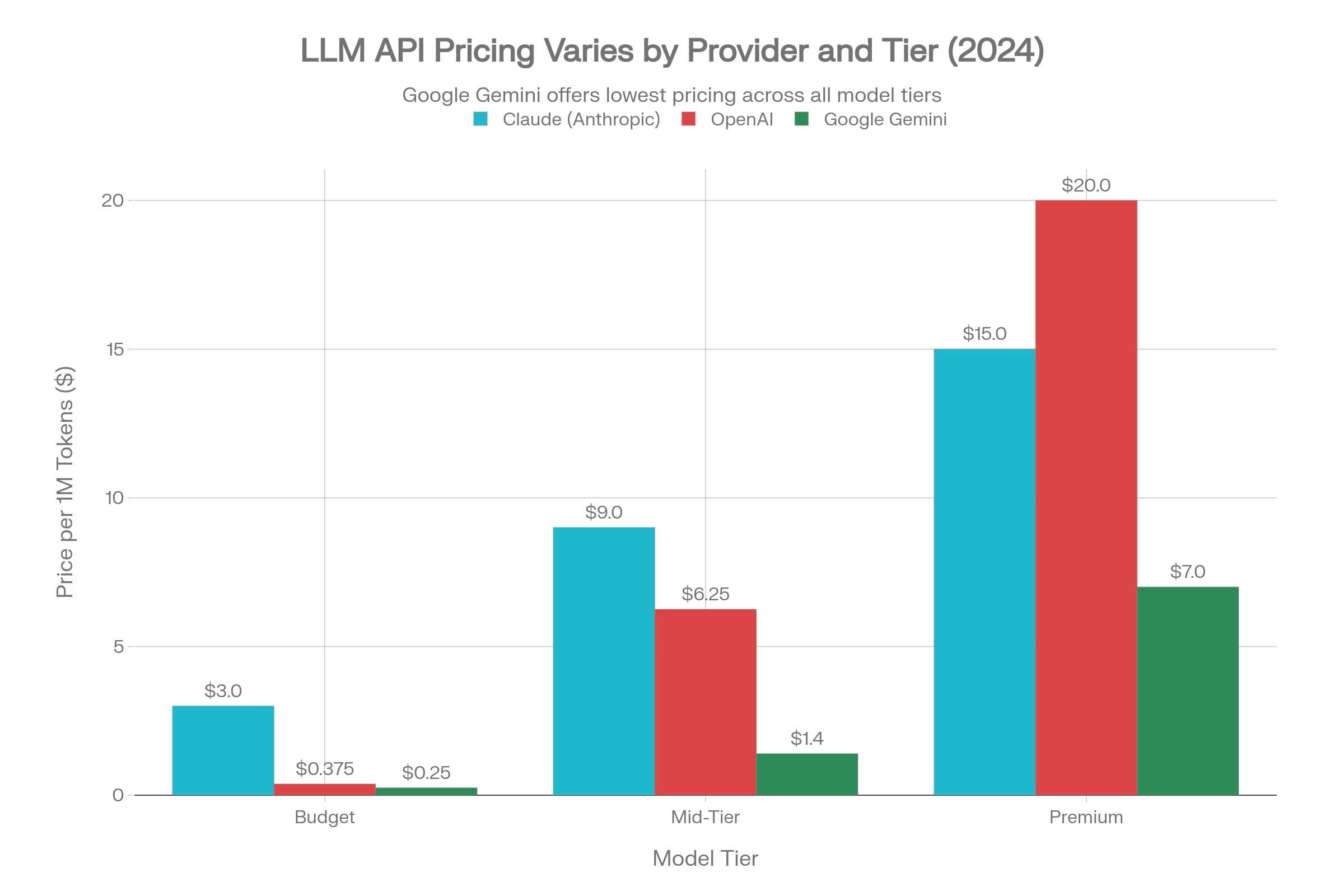
OpenAI API – ballpark 2026 numbers
GPT‑4o Mini
Very cheap: well under $1 per 1M tokens combined input/output
Good for utility tasks and small agents
GPT‑4o / GPT‑4 Turbo / GPT‑5
Mid‑tier models in the $2–10 per 1M input tokens range and $10–30 per 1M output tokens
Premium reasoning models (like o1) are significantly higher
Google Gemini API – ballpark 2026 numbers
Flash / Flash‑Lite: cents per 1M tokens (very cheap, good for bulk tasks)
Pro tiers: similar to GPT‑4o / Claude Sonnet, around $1–$2 input and $10–$12 output per 1M tokens
The takeaway: the LLM itself is not free, but with good prompt and workflow design it becomes predictable.
2. Supporting APIs (Search, etc.)
Moltbot often uses a search API to ground answers.
Brave Search API example
Free tier: a small number of queries/month
Paid tiers: roughly $5–$10 per 1,000 search requests, depending on the plan
For a typical MSME agent:
Light search use: $5–$20/month
Heavy agent search: $50–$100/month
3. Cloud Hosting
You can run Moltbot on a local machine, but if you want it available 24/7 you’ll likely use a virtual machine (VM).
Google Cloud / AWS ballpark
Small VM (2 vCPUs, 4–8 GB RAM): $15–$70/month
Mid VM (4 vCPUs, 16 GB RAM): $80–$150/month
For most MSMEs:
A small VM is enough → budget $20–$70/month just for hosting
4. Your Time (The Biggest Cost)
The part no one prices in: you.
Typical time sinks:
Initial setup (VM, Moltbot, WhatsApp/Telegram, SSL, DNS): 4–8 hours
OAuth for Google Workspace (Gmail, Calendar, Drive): 2–4 hours per integration
Debugging gateway issues, browser relay glitches, message echo loops: 1–3 hours/week
Prompt and workflow design: 2–5 hours/month
Security tightening, backups, upgrades: 2–4 hours/quarter
Even if you value your time at just ₱1,500/hour (~$27/hour), ten hours per month in “AI ops tinkering” is $270/month in opportunity cost — on top of your API and hosting bills.
DIY Cost Summary
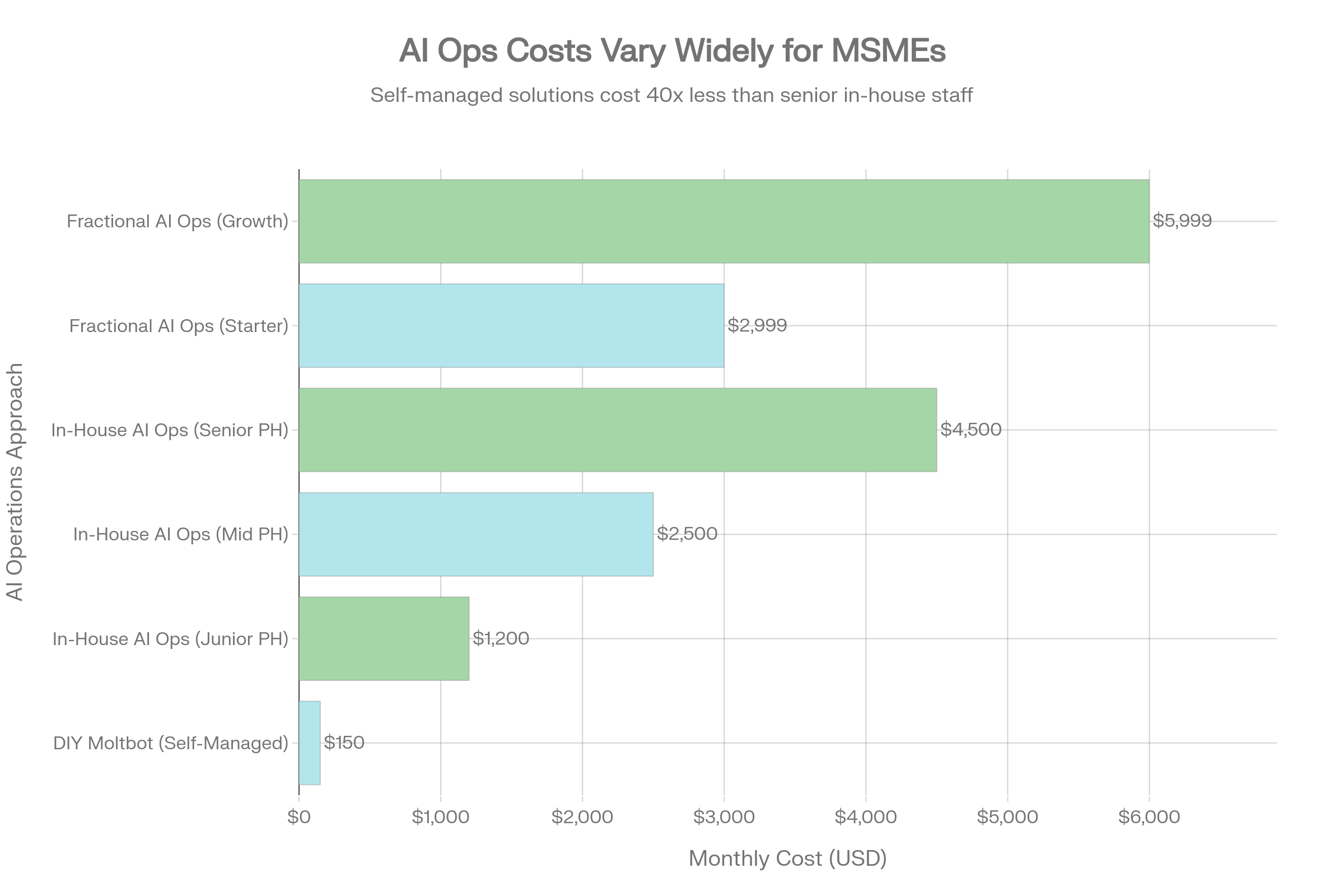
If we combine all of that, a realistic DIY Moltbot monthly cost looks like:
Light use (side experiment)
LLM: $30–$50
Search/API: $5–$10
Hosting: $15–$30
Your time (say 5 hours): ~$135
Total: ~$185–$225/month
Serious MSME use (ops + marketing)
LLM: $100–$200
Search/API: $20–$50
Hosting: $50–$100
Your time (10 hours): ~$270
Total: ~$440–$620/month
And this still assumes you are the AI ops person.
How Moltbot Compares to Other AI Agent Options
Moltbot isn’t the only way to get an AI agent. Here’s a simplified landscape:
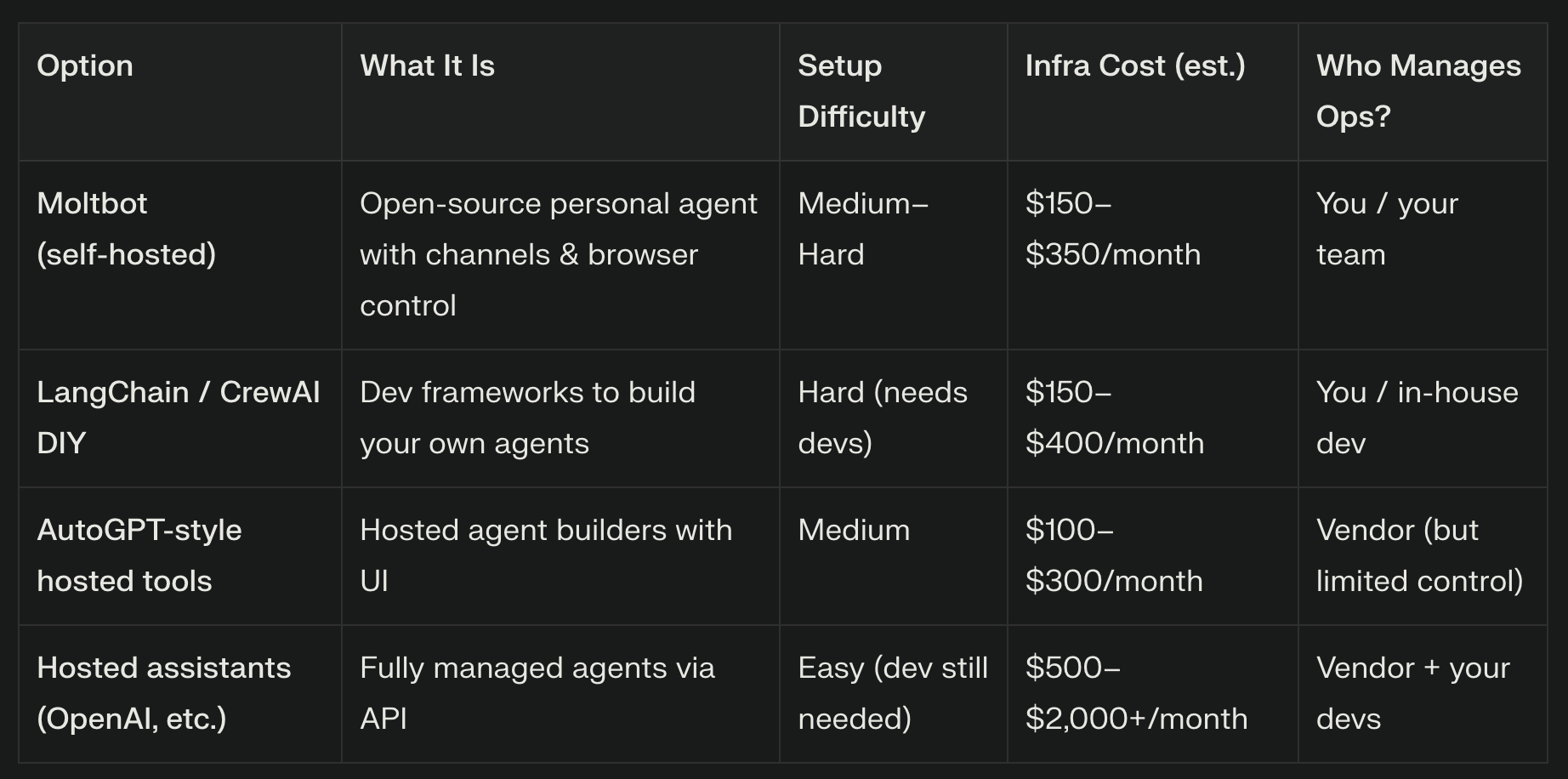
Moltbot gives you maximum control and data locality, at the price of maximum operational responsibility.
In‑House AI Ops vs Fractional AI Ops
If you don’t go DIY, the next thought is: “Why not hire someone full‑time to handle all of this?”
In‑House AI Ops Hiring (Philippines)
Indicative 2026 market ranges:
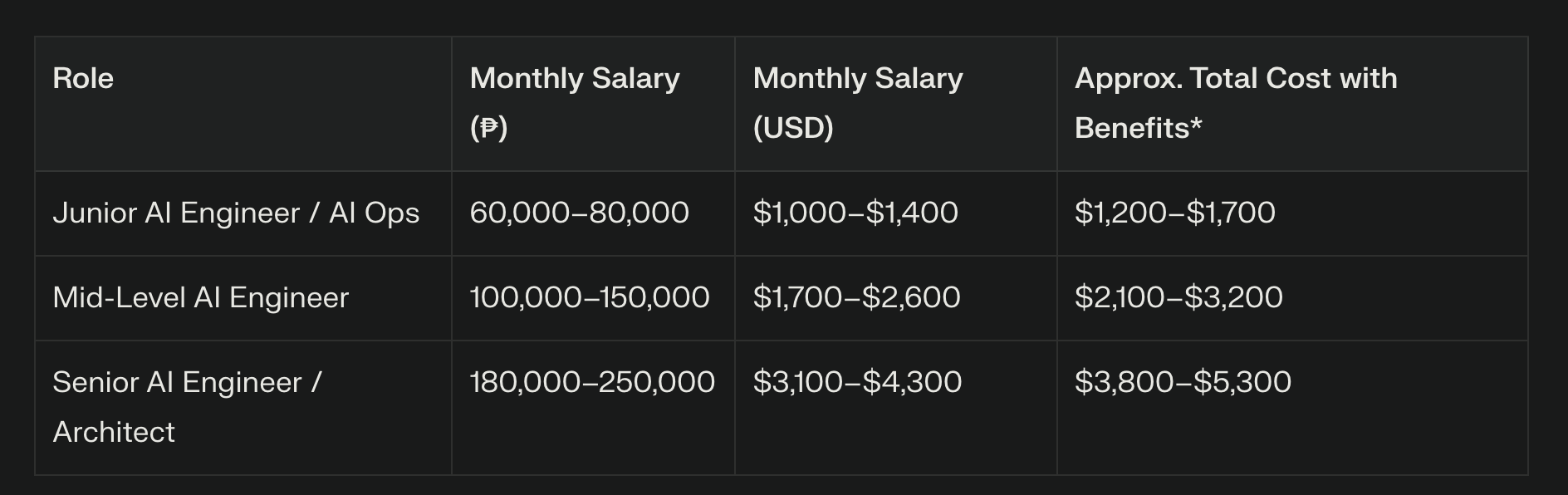
*Benefits = government contributions, HMO, 13th month, etc.
This buys you:
1 person, 40 hours/week
Recruitment time and risk
Management overhead
Single‑point‑of‑failure knowledge
For a lot of PH MSMEs and agencies, that’s simply too much fixed cost relative to how much AI ops they actually need.
Fractional AI Ops
This is where a fractional AI Ops partner comes in — think of it as having an AI‑literate CMO/COO + implementation team on retainer instead of a single full‑time hire.
Typical packages in the global market:
Starter / Pilot engagements: around $2,500–$3,500/month
Strategic design + a handful of high‑leverage workflows
Light monitoring and improvement
Growth engagements: around $5,000–$7,000/month
Deeper integration across tools (CRM, project management, finance)
Continuous tuning, analytics, and new automations
You’re essentially renting:
Architecture and security design
Workflow design and documentation
Cost and performance monitoring
Training for your team
A roadmap as tools and models evolve
Use Cases for PH MSMEs
The big question: What can this actually do for a local MSME in the Philippines?
Based on my own Moltbot experiment and the patterns I see across clients, here are practical, near‑term use cases:
1. Founder / CEO Briefings
Daily WhatsApp digest:
Today’s meetings, with context and prep notes
Yesterday’s key emails (clients, suppliers, partners)
Overdue proposals, invoices, or approvals
Weekly CEO summary:
What happened
What slipped
What needs your decision
2. Marketing Ops Automation
Shared inbox triage:
Tag and prioritize incoming leads, support requests, partner inquiries
Generate draft replies for routine questions
Content asset audit:
Map what’s in your Google Drive / shared folders (decks, case studies, social assets)
Highlight gaps vs your current campaigns and goals
3. Agency / Studio Client Service
Per‑client dossiers:
Before each call, pull recent emails, documents, and tasks into a one‑page brief
Post‑meeting workflows:
Turn raw notes into client‑friendly recaps and internal task lists
Account health monitoring:
Flag clients with stalled activity, late approvals, or expiring retainers
4. Sales Support
Inquiry analysis:
Identify hot leads, price‑sensitive inquiries, partnership options
Proposal support:
Draft proposal outlines from templates + last conversation notes
Renewal nudges:
Surface contracts and subscriptions that need attention in the next 30 days
5. Admin & Life Ops for Founders
Travel/logistics:
Compare hotel quotes from email, summarize and recommend
Calendar hygiene:
Catch double‑bookings, missing Zoom links, or meetings without agendas
Personal guardrails:
The same agent that can tell you, “Your calendar is clear. You’ve been awake 17 hours. Go to sleep.”
Why Work With a Fractional AI Ops Partner (Like Third Team Ventures)
So where does this leave MSMEs and marketing teams?
If you:
Don’t want to become your own AI sysadmin
Don’t have the budget for a full‑time AI engineer
Don’t want to risk misconfiguring security around email, calendar, and files
…then the most rational move is to treat AI ops as a specialized function you outsource, the same way you might outsource legal, tax, or high‑end design.
What a fractional AI Ops partner does for you:
Designs the architecture
Chooses whether Moltbot or another stack fits your risk and budget
Sets up infrastructure, VPN, backup, and monitoring
Implements high‑leverage workflows
Founder briefings, marketing ops, client servicing, sales support
Documented so they survive staff changes
Manages cost and performance
Keeps your Claude/OpenAI/Gemini bills under control
Tunes prompts and workflows to maximize ROI, not just “wow” factor
Keeps things secure and compliant
Proper handling of credentials, scopes, and access
Guardrails around what the agent can see and do
Trains your team
How to talk to the agent
What to trust, what to verify, and when to escalate to a human
At Third Team Ventures, this is exactly what we’re building: a fractional AI Ops team that sits beside your existing marketing and operations, so you get the benefits of tools like Moltbot without the headaches and risks of doing it alone.
If you’re an MSME owner or marketing lead who sees yourself in this story — too many tabs, too many emails, not enough bandwidth — your next move doesn’t have to be “learn DevOps” or “hire a full‑time AI engineer.”
It can simply be: “Let’s get a fractional AI Ops partner to own this for us.”
And then we build from there.